Overview
This guide describes how to implement the Reserve flow for attractions: checking entitlements, guiding the guest when they have none or need to redeem, and creating reservations using the Ordino API. It also covers how to fetch and display a guest’s existing reservations.
All API calls in this flow must be made in the end-user context using a Bearer token. See API Authentication for details. Request and response shapes match the Common Park API OpenAPI spec.
Prerequisites
CMS configuration
- Configure your CMS so that each attraction that supports reservation has a
queue_id. queue_idvalues are provided by Ordino and identify the virtual queue (attraction) in the system.- Use these
queue_idvalues when calling the reservation and entitlements APIs.
Reserve button
- Each attraction interaction screen should expose a Reserve button (or equivalent action).
- When the user taps or clicks Reserve, the app should follow the flow below.
Reserve flow
The flow has three main steps:
- Check entitlements — Call
/api/entitlementsto see what the guest can use. - Handle the result — Either direct the guest to purchase/redeem, or let them choose which entitlements to use.
- Create a reservation — Call
/api/sessions/actions/reservewith the chosenqueue_idandsession_keys from the selected entitlements.
Flow diagram
flowchart TD
    A[User clicks Reserve] --> B[GET `/api/entitlements`]
    B --> C{total = 0?}
    C -->|Yes| D[Direct guest to buy\n e.g. web store, in-app purchases]
    C -->|No| E{Any entry with state `allowed`?}
    E -->|No| F[Direct guest to redeem\n available entitlements]
    E -->|Yes| G[Show entries where state is `allowed`]
    G --> H[User selects entitlements by session_key]
    H --> I[POST `/api/sessions/actions/reserve`\n queue_id + session_keys]
    I --> J{201 Created?}
    J -->|Yes| K[Reservation created]
    J -->|No| L[Handle error — see error reference]
Loading and errors
- Loading: While calling
/api/entitlementsor/api/sessions/actions/reserve, disable the Reserve button (or equivalent) and show a loading indicator (e.g. spinner or skeleton) so the guest knows the app is working. Avoid letting them submit again before the request finishes. - Errors: If the API returns an error (e.g. 4xx or 5xx), show the message to the user (toast, banner, or inline), using the response
titleordetailif available. Offer a “Try again” action where it makes sense, and a way to get help (e.g. “Contact support”) for repeated or unclear failures. See the error reference for specific error codes and handling.
Step 1: Call /api/entitlements
When the user clicks Reserve, the application should call the entitlements endpoint to see what the guest has available (e.g. passes, vouchers, session credits). You can optionally pass queue_id as a query parameter to filter entitlements for that attraction.
Example request:
1
2
3
4
GET /api/entitlements?queue_id=queue_roller_coaster_01 HTTP/1.1
Host: {park_id}.dev.ordino.global
Authorization: Bearer <user_access_token>
Accept: application/json
Example response (200 OK) — guest has entitlements; some are allowed for this queue:
1
2
3
4
5
6
7
8
9
10
11
12
13
14
15
16
17
18
19
20
21
22
23
24
25
26
27
28
29
30
31
32
33
34
35
36
37
38
39
40
41
42
43
44
45
{
  "success": true,
  "total": 2,
  "count": 2,
  "page": 1,
  "page_size": 10,
  "items": [
    {
      "session_key": "sk_abc123xyz",
      "state": "allowed",
      "can_reserve": true,
      "queue_id": "queue_roller_coaster_01",
      "reservation_type": "parallel",
      "total_count": 5,
      "remaining_count": 3,
      "available_after": null,
      "metadata": {
        "package_id": "pkg_ride_pass",
        "package_name": "Single Ride Pass",
        "locator_code": "LOC-001",
        "nickname": null,
        "user_id": null
      },
      "reservation": null
    },
    {
      "session_key": "sk_def456uvw",
      "state": "not_allowed_on_queue",
      "can_reserve": false,
      "queue_id": "queue_roller_coaster_01",
      "reservation_type": "parallel",
      "total_count": 5,
      "remaining_count": 5,
      "available_after": null,
      "metadata": {
        "package_id": "pkg_other_ride",
        "package_name": "Other Ride Pass",
        "locator_code": "LOC-001",
        "nickname": null,
        "user_id": null
      },
      "reservation": null
    }
  ]
}
Example response (200 OK) — no entitlements (total = 0):
1
2
3
4
5
6
7
8
{
  "success": true,
  "total": 0,
  "count": 0,
  "page": 1,
  "page_size": 10,
  "items": []
}
Example response (200 OK) — entitlements exist but none are allowed (e.g. need to buy something or choose another queue):
1
2
3
4
5
6
7
8
9
10
11
12
13
14
15
16
17
18
19
20
21
22
23
24
25
26
27
{
  "success": true,
  "total": 1,
  "count": 1,
  "page": 1,
  "page_size": 10,
  "items": [
    {
      "session_key": "sk_xyz789",
      "state": "not_allowed_on_queue",
      "can_reserve": false,
      "queue_id": null,
      "reservation_type": null,
      "total_count": null,
      "remaining_count": null,
      "available_after": "2025-03-14T09:00:00Z",
      "metadata": {
        "package_id": "pkg_voucher",
        "package_name": "Ride Voucher",
        "locator_code": "LOC-002",
        "nickname": null,
        "user_id": null
      },
      "reservation": null
    }
  ]
}
Use total and each item’s state and can_reserve to branch as in Step 2. Only entries with state: "allowed" and can_reserve: true can be used for the reserve call; use their session_key in the request.
Step 2: Handle the entitlements result
Branch on the response:
| Condition | Action |
|---|---|
No entries (total = 0 or items empty) |
Direct the guest to purchase something (e.g. link to web store, in-app purchases, or ticket booth). |
No entries with state: "allowed" |
Direct the guest to purchase something or redeem their available entitlements before they can reserve (e.g. “Redeem your pass” or “Activate your voucher”), or they may need to wait until available_after. |
Some entries with state: "allowed" and can_reserve: true |
Let the guest select which one(s) to use and collect their session_key values for the reserve call. |
UX examples by outcome
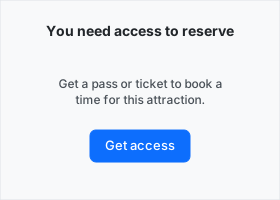
- No entitlements (
total = 0)- Headline: e.g. “You need access to reserve”.
- Body: e.g. “Get a pass or ticket to book a time for this attraction.”
- Primary CTA: e.g. “Get access” or “Buy now” — link to your web store, in-app purchases, or ticket booth.
- Entitlements but none allowed
- Headline: e.g. “You can’t use these here yet”.
- Body: explain that they must redeem or activate their pass/voucher first, or wait if
available_afteris set (e.g. “This pass becomes valid for this ride on [date/time].”). - CTAs: e.g. “Redeem” or “Activate” (to your redemption flow), and optionally “Buy more” or “See other rides”.
- Some entries with
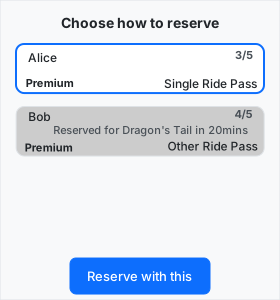
state: "allowed"- Show only items where
stateisallowedandcan_reserveistrue. - For each entry, display: package name (e.g.
metadata.package_name), and remaining uses if relevant (e.g. “3 of 5 left” fromremaining_count/total_count). - Let the guest pick one or more (depending on your rules); collect the
session_keyfor each selected item. - Primary action: e.g. “Reserve with this” or “Book my spot” — then call the reserve API with the chosen
session_key(s).
- Show only items where
Step 3: Call /api/sessions/actions/reserve
After the guest has selected which entitlements to use, call the reserve endpoint with:
- The
queue_idfor the attraction. - The
session_keysfrom the selected entitlement items (each item’ssession_key).
Example request:
1
2
3
4
5
6
7
8
9
10
POST /api/sessions/actions/reserve HTTP/1.1
Host: {park_id}.dev.ordino.global
Authorization: Bearer <user_access_token>
Content-Type: application/json
Accept: application/json

{
  "queue_id": "queue_roller_coaster_01",
  "session_keys": ["sk_abc123xyz"]
}
Optional body field: reservation_type — one of parallel, premium, time_bank, reverse (if not provided, the API uses the default for the entitlementparallel).
Example response (201 Created):
1
2
3
4
5
6
7
8
9
10
Content-Type: application/json
Location: https://{park_id}.dev.ordino.global/api/reservations/r_123dhjgh

{
  "success": true,
  "title": null,
  "detail": null,
  "trace_id": "trace_abc123",
  "status": 201,
}
Success UX: After a 201, show a short confirmation (e.g. “You’re reserved” or “Spot reserved”) and either a “View reservation” link (to the reservation detail or list) or return the user to the attraction screen with the reservation state updated (e.g. show “You have a reservation” and the new reservation in the list). Use GET /api/reservations to fetch and display the new reservation (see below).
Displaying reservations
Fetching the list of reservations
Call the reservations endpoint to get the list of reservations for the current user. Responses are paginated and use items for the list (see API Reference for full schema).
All reservations:
1
2
3
4
GET /api/reservations HTTP/1.1
Host: {park_id}.dev.ordino.global
Authorization: Bearer <user_access_token>
Accept: application/json
Example response (200 OK):
1
2
3
4
5
6
7
8
9
10
11
12
13
14
15
16
17
18
19
20
21
22
23
24
25
26
27
28
29
30
31
32
33
34
35
36
37
38
39
40
41
42
43
44
45
46
47
48
49
{
  "success": true,
  "total": 2,
  "count": 2,
  "page": 1,
  "page_size": 10,
  "items": [
    {
      "reservation_id": "res_7f3a2b1c",
      "url": "https://{park_id}.dev.ordino.global/api/reservations/res_7f3a2b1c",
      "queue_id": "queue_roller_coaster_01",
      "queue_name": "Thunder Coaster",
      "queue_url": "https://{park_id}.dev.ordino.global/api/queues/queue_roller_coaster_01",
      "reservation_type": "parallel",
      "status": "ready",
      "state": "ready",
      "wait_time_at_reservation": 30,
      "remaining_wait_time": 0,
      "ready_at": "2025-03-13T15:00:00Z",
      "cancel_url": "https://{park_id}.dev.ordino.global/api/reservations/res_7f3a2b1c",
      "token": "tk_abc123",
      "token_url": "https://{park_id}.dev.ordino.global/api/reservations/res_7f3a2b1c/token",
      "members": [
        {
          "user_id": null,
          "session_id": "sess_xyz",
          "url": "https://{park_id}.dev.ordino.global/api/sessions/sess_xyz"
        }
      ]
    },
    {
      "reservation_id": "res_9d4e5f6g",
      "url": "https://{park_id}.dev.ordino.global/api/reservations/res_9d4e5f6g",
      "queue_id": "queue_water_ride_02",
      "queue_name": "Splash Falls",
      "queue_url": "https://{park_id}.dev.ordino.global/api/queues/queue_water_ride_02",
      "reservation_type": "parallel",
      "status": "waiting",
      "state": "waiting",
      "wait_time_at_reservation": 45,
      "remaining_wait_time": 20,
      "ready_at": "2025-03-13T16:30:00Z",
      "cancel_url": "https://{park_id}.dev.ordino.global/api/reservations/res_9d4e5f6g",
      "token": "tk_def456",
      "token_url": "https://{park_id}.dev.ordino.global/api/reservations/res_9d4e5f6g/token",
      "members": []
    }
  ]
}
Reservation state values: waiting, paused, canceled, expired, ready, completed.
Reservations for a specific attraction (filtered by queue_id):
1
2
3
4
GET /api/reservations?filter=queue_id:queue_roller_coaster_01 HTTP/1.1
Host: {park_id}.dev.ordino.global
Authorization: Bearer <user_access_token>
Accept: application/json
Replace queue_roller_coaster_01 with the attraction’s queue_id from your CMS.
Example response (200 OK) — filtered to one attraction:
1
2
3
4
5
6
7
8
9
10
11
12
13
14
15
16
17
18
19
20
21
22
23
24
25
26
27
{
  "success": true,
  "total": 2,
  "filtered_count": 1,
  "count": 1,
  "page": 1,
  "page_size": 10,
  "items": [
    {
      "reservation_id": "res_7f3a2b1c",
      "url": "https://{park_id}.dev.ordino.global/api/reservations/res_7f3a2b1c",
      "queue_id": "queue_roller_coaster_01",
      "queue_name": "Thunder Coaster",
      "queue_url": "https://{park_id}.dev.ordino.global/api/queues/queue_roller_coaster_01",
      "reservation_type": "parallel",
      "status": "ready",
      "state": "ready",
      "wait_time_at_reservation": 30,
      "remaining_wait_time": 0,
      "ready_at": "2025-03-13T15:00:00Z",
      "cancel_url": "https://{park_id}.dev.ordino.global/api/reservations/res_7f3a2b1c",
      "token": "tk_abc123",
      "token_url": "https://{park_id}.dev.ordino.global/api/reservations/res_7f3a2b1c/token",
      "members": []
    }
  ]
}
Where to show reservations in the app
- Per-attraction screen — Use
GET /api/reservations?filter=queue_id:<queue_id>and display that attraction’s reservations (e.g. “Your reservations for this ride”). - Global list — Use
GET /api/reservations(no filter) and show all of the guest’s reservations in a central place (e.g. “My reservations” or “My day” screen).
You can combine both: a global list plus per-attraction filtered views for each ride or experience.
List and card UX
For each reservation in the list (or card), show:
- Queue/attraction name — e.g.
queue_name(“Thunder Coaster”). - Status — from
state: e.g. “Waiting”, “Ready”, “Completed”, or “Canceled”. - Wait time — when
stateiswaiting, show “About X min left” usingremaining_wait_time(or “Ready at [time]” usingready_at). - Ready at — when relevant, show the time the reservation becomes ready (
ready_at), e.g. “Ready at 3:00 PM”. -
Cancel — expose a “Cancel reservation” action that uses the reservation’s
cancel_url(see API reference for the cancel method).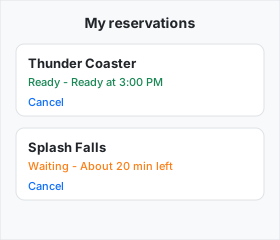
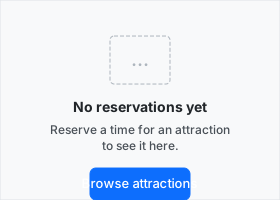
Empty state: When items is empty, show a short message such as “No reservations yet” with supporting copy (e.g. “Reserve a time for an attraction to see it here.”) and a CTA to browse or reserve if appropriate.