Overview
Overview
This page provides a reference implementation for an entitlement picker used in the reservation flow.
When a guest clicks Reserve on a queue details screen, the picker displays available entitlements, enforces selection constraints, and submits a reservation using the selected items.
Treat this as implementation guidance rather than a strict visual specification; your product UI can differ as long as the functional rules below are preserved.
API flow
- The user clicks Reserve on the queue details screen.
- The app calls
GET /api/entitlementswithqueue_idto fetch the user’s entitlements for that queue. - The app displays the returned entitlements as cards.
- The user selects one or more valid entitlements.
- The app calls
POST /api/sessions/actions/reserve. Selectedentitlement_keyvalues are passed in the reserve requestsession_keysfield.
UI requirements
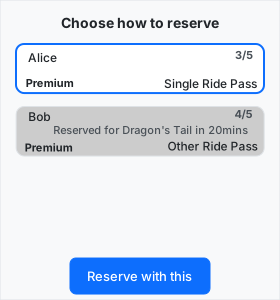
The visual and interaction behavior will follow the concept below.
Entitlement cards
- Display each returned entitlement as a card.
- Each card should toggle between
unpressedandpressedwhen clicked, if enabled. - Each card should display:
- guest
nickname, - entitlement
title, reservation_type, andremaining_count/total_count.
- guest
- Each card should use a distinct color by
reservation_type.
Disabled state rules
An entitlement should be disabled when any of the following is true:
is_usable: falseis_eligible: falsereservation_typediffers from an already selected entitlement (onereservation_typeper reservation)session_keymatches an already selected entitlement (one selected entitlement per session)
When disabled, the card should:
- be visibly disabled,
- not be clickable, and
- show a clear user-facing reason.
Disabled reason sources
When showing a disabled reason:
- For unusable entitlements, use the reason from
usability(see API docs for possible values). - For ineligible entitlements, use the reason from
eligibility(see API docs for possible values). - For
reservation_typemismatch, show a message that it conflicts with the selected reservation type. - For duplicate
session_key, show that it is blocked by an already selected entitlement.
Map reason codes to user-friendly strings. Include additional context where available:
- If
usabilityisnot_available, includeavailable_from. - If
usabilityisalready_reserved, include relevant data fromreservation(queue plus remaining wait or ready time). - If
eligibilityisnot_enough_minutes, includeminutes_remaining.
Validation before reserve
If an entitlement has requires_entitlement, the picker should not proceed until all required entitlements are selected.
Optionally, highlight remaining entitlements that satisfy unmet requirements so the user can complete selection.
Optional UX improvements
The UI could simply hide all entitlements that are not usable or eligible to make the reservation.
- The main problem with this is that users may not understand WHY their entitlements are not being displayed. If they are displayed, you can display a reason why they can’t be used which should answer this frustration of the guest.
The UI could include a reservation_type selector if more than one reservation_type exists among the returned entitlements. This would potentially allow the list of entitlements to be shortened and make it easier for guests to understand.
If more than one entitlement exists with the same session_key, they could be grouped in some way. Perhaps keep them together and then when one is selected use an animation to collapse the others underneath the selected one (so it looks like a deck of cards)?
If an entitlement has a requirement, it could be linked in some way to the entitlements that satisfy the requirement, perhaps requiring that you select one of the requirements immediately after selection (highlighting the requirements/hiding the non-requirements), and allowing further selections afterwards.
It is also possible to add “problem solving” directly into the picker interface.
- If a session already has a reservation, the entitlement could include a means to cancel that reservation from this interface without having to go through the reservations interface.
- If a session is redeemable, but not redeemed, the session could be redeemable directly from within this interface.
React Example
The following example shows a possible implementation of the above specification using ReactJS.
The example interacts directly with a real API, so in order to make use of it, you need to create an appropriate order to work with using the POST /api/orders API.
The example uses Basic authentication for simplicity. In a real system, Bearer authentication is required and Basic authentication is disabled. For further details, see Authentication.
The example uses Basic authentication for simplicity. In production, Basic auth is not available and user-facing reservation flows should use Bearer authentication. For details, see Authentication.
Edit the React code on the left and see the live output on the right.